Paginel Text for desktop
Your AI, your documents, your computer.
The model, the document and the agent stay with you.
With Ollama, an AI model runs on your computer. The Paginel Text desktop app opens to it the documents you give it, and only those: it reads them, adds to them and comments on them before your eyes, signed with its name. Nothing goes online if your MCP client, the program where you talk to the model, uses this Ollama model.
Descargar The step-by-step guide
In the Paginel Text desktop app, version 0.3.0 or later. You also need Ollama, a model and an MCP client.
On the computerEverything stays with you
-
The model
It runs on your computer, with Ollama.
-
Your MCP client
The program where you talk to the model: we tried ollmcp and Hermes Agent. It starts Paginel Text and gives its tools to the model.
-
Paginel Text
The desktop app, started by your client, is the MCP server. It opens no port and talks only to the Paginel on this computer.
-
Your document
A file on the computer, open in Paginel Text. The model touches it only through Paginel, never through the file.
Nothing leaves the computer if:
- your MCP client uses the Ollama model on the computer: Paginel cannot see which model it calls, so check its settings;
- the document is a file on the computer, open in the desktop app.
The stepsThree steps per document
Open the file in Paginel Text (File › Open a Word or Markdown file…), then:
- Insert › Agent, then Local agent. For a single section: right-click its heading, Connect an agent to this section…
- Choose what it may do: Read-only, Editing · Assigned sections or Editing · Whole document.
- Under “A model on this computer (Ollama…)?”, click Copy the MCP configuration: the document is given to the model, and the configuration copied. Paste it once into your MCP client; for the next documents, the button is enough.
Then ask, in your client, in plain words: its changes show up in the document’s window.
You stay in chargeSigned, and undoable
Through Paginel, never through the file
The model neither reads nor writes the file on disk. Its changes show up in the window, and the file changes only when you save.
Signed with its name
Every change carries the agent’s name: ia by default, the one the dialog suggests.
Undoable
Everything it writes can be undone in Edit › Version history…, like your own changes.
Cut off at once
Among the people, at the top right, the Local agent entry: Cut the access stops it right away. Closing the document’s window does too.
What forSmall tasks
A model that fits on a computer does best with short, precise requests. For example:
- “Add the task ‘Review the budget’ to the task list.”
- “Add a note at the end of the document: the meeting is moved to Thursday.”
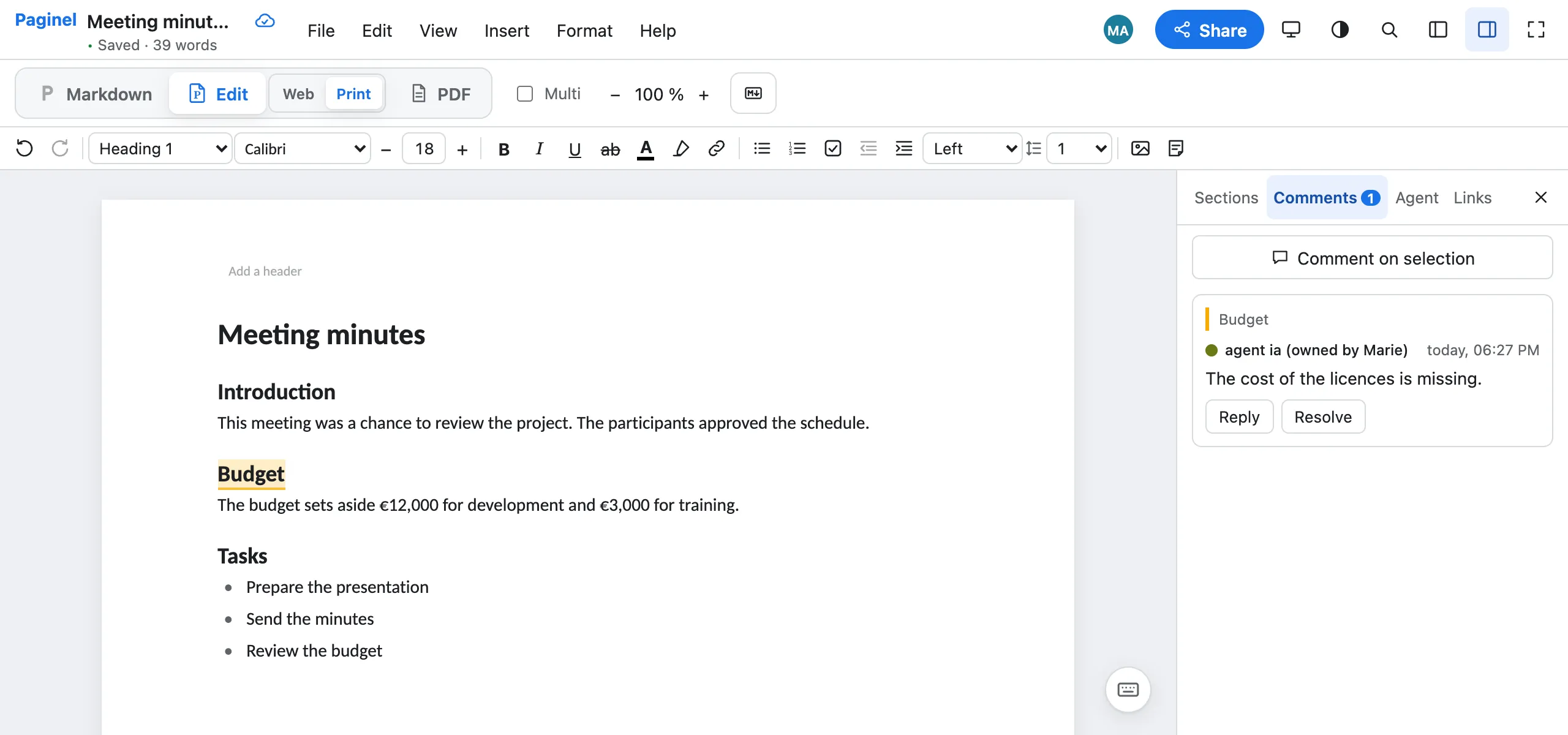
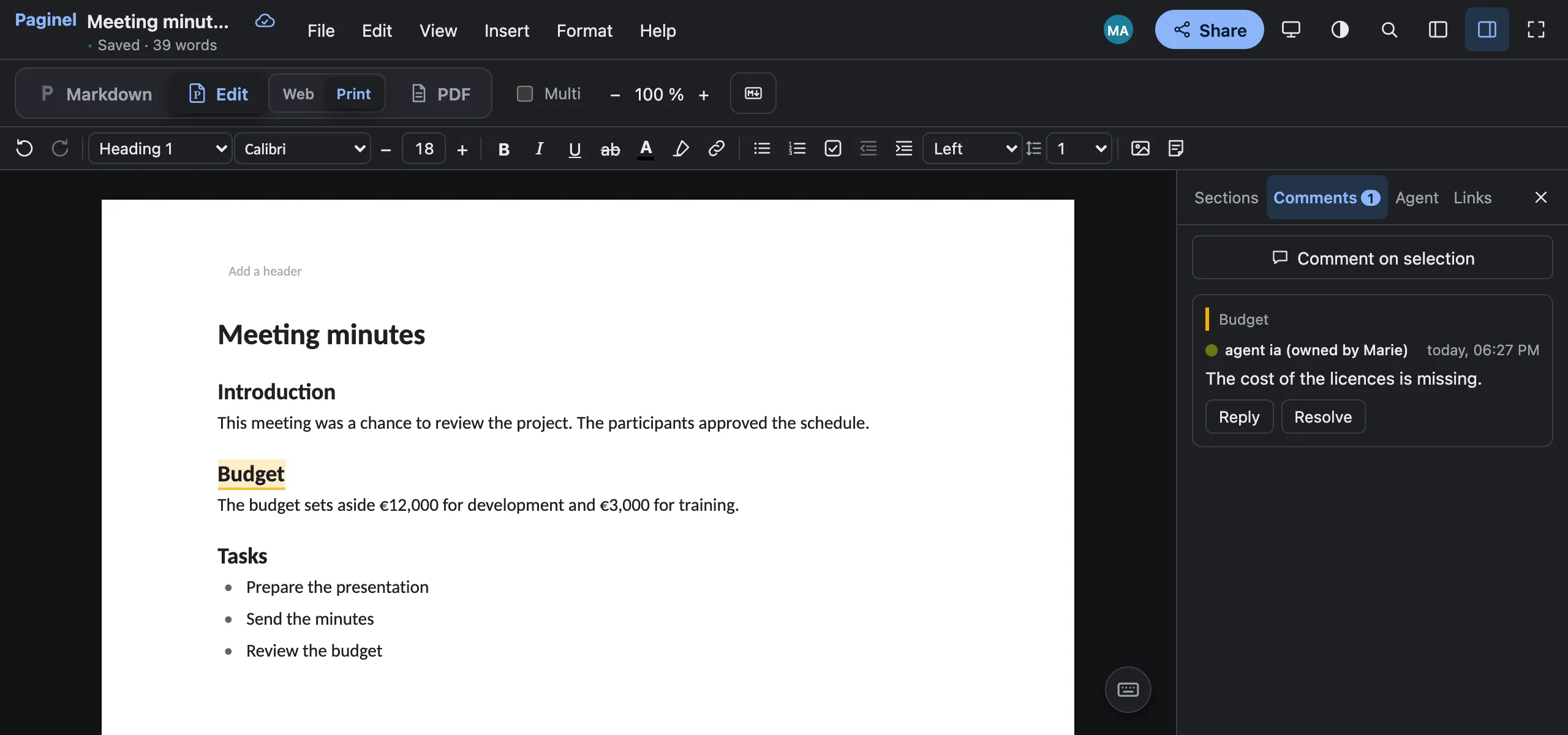
- “Comment on the Budget section: the cost of the licences is missing.”
It can read the document or a section, fix a passage, rewrite a section, add text at the end of a section or of the document, comment on a passage or a section.
Read it over With a small model, a finer task, such as fixing every mistake in a section, may stay unfinished, even when it says it did everything. Everything can be undone in the history.
MeasuredWhat we measured
On 2 November 2026, on a Linux computer with a 12 GB graphics card (RTX 3060), and the gemma4:e4b model (9.6 GB), in French and in English:
- 21 out of 22 requests succeeded with our test client, under a strict check: exactly what was asked, the rest of the document untouched
- 4 to 30 s per request, once the model is loaded
- ≈ 1 min 30 s to load the model, the first time
The requests: the three above, and fixing the spelling mistakes of a section. With two MCP clients, ollmcp and Hermes Agent, the same requests succeed 11 and 10 times out of 12; the other times, the task is added, once and in the right place, but written differently (“Task: …”, a checkbox).
A smaller model, qwen3:4b (2.5 GB), adds a task well (8 times out of 8), but fixes a text poorly.
Not measured yet: a computer without a graphics card, other models, macOS and Windows.
Not yetWhat it does not do (yet)
- Read or write the file on disk: it goes through Paginel, and you are the one who saves.
- Open a document you have not given it.
- Talk to another machine: Paginel’s MCP server opens no port.
- Delete or rename a document.
- Work in the browser: only the desktop app gives a file to a model on the computer.
- With an Ollama model and an MCP client, it was tried on Linux only. On macOS and Windows, we checked Paginel Text’s MCP server, not yet with a model.
Developers and agents
MCPFor developers
Paginel Text is itself the MCP server: your client starts it with --mcp and talks to it through its standard input and output (stdio), with no port at all. It talks only to the Paginel on this computer (127.0.0.1) and refuses any other address.
A real exchange with gemma4:e4b (test of 2 November, agent ia, on the document of the screenshot above):
An MCP client, with gemma4:e4bRequest: Comment on the Budget section: the cost of the licences is missing.→ list_documents {}← 1 document open to you, as agent:ia: - « meeting-minutes » …→ read {"doc": "meeting-minutes"}← Document « meeting-minutes » … (the Markdown, and each section’s id)→ add_comment {"section": 7016024694199154, "text": "The cost of the licences is missing."}← Comment added (id …)Answer: Comment added to the Budget section. The configuration to paste, the command that checks what the MCP server sees, and the server on its own for your tests: A local model on your documents (Ollama).
Try it on your documents
Download Paginel Text for desktop, install Ollama and a model, then follow the step-by-step guide.