In the documentation Write in Markdown
Markdown
Write in Markdown
Markdown is plain text: hash signs for headings, asterisks for bold. In Paginel, it is a view of the document like the others: what you type there goes into the same document, and into the same Word file.
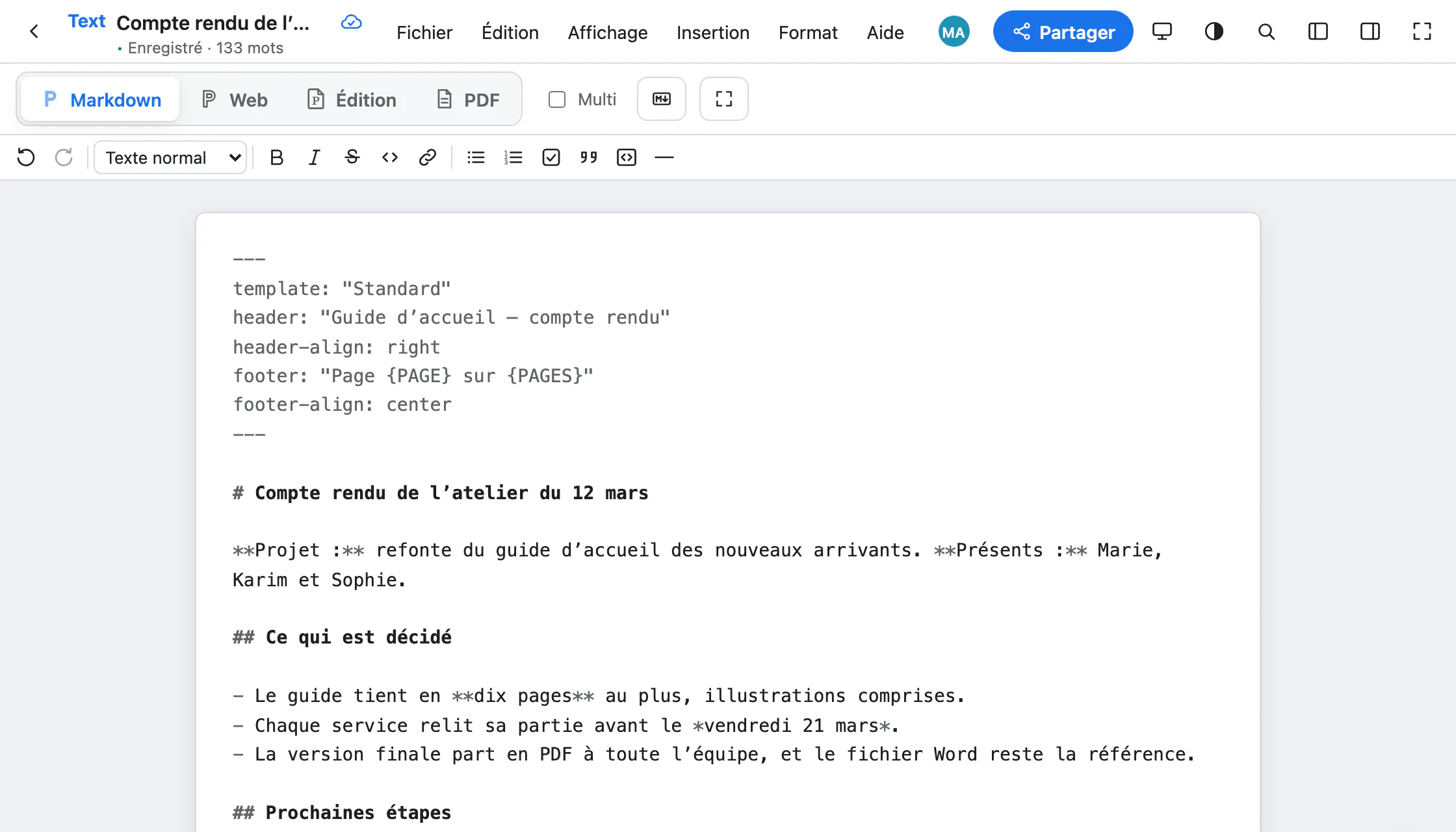
The Markdown view
The Markdown button at the top, or ⌥⇧⌘1, shows the document’s source text. You type in it directly; after a short pause, the text goes into the document, paragraph by paragraph. The paragraphs you did not touch keep all their Word formatting.
The toolbar writes the marks for you: bold, italic, strikethrough, code, link, lists, task, quote, code block, horizontal line.
A document, in Markdown
The top of the file, between two --- lines, sets the layout: the template, the header, the footer. The rest is the text.
minutes.md---template: "Standard"footer: "Page {PAGE} of {PAGES}"---# Minutes of the 12 March workshop**Project:** a new welcome guide.## What we decided- The guide is **ten pages** at most.- Each team reviews its part by *21 March*.> A short guide is a guide people read. The useful syntax
| You type | You get |
|---|---|
# Heading | A level 1 heading (## for level 2, down to ######) |
**bold** | Bold |
*italic* | Italic |
~~struck~~ | Strikethrough |
`code` | Inline code |
[text](https://…) | A link |
- item | A bulleted list (indented: a sub-list) |
1. item | A numbered list |
- [ ] to do | A task, with its ☐ box |
> quote | A quote |
``` | A code block (one ``` line before, one after) |
--- | A horizontal line |
text[^1] | A footnote reference; the note goes further down: [^1]: … |
Paste Markdown
In the Editing or Web view, pasted Markdown (⌘V) becomes formatted text: headings take the document’s styles. Handy for an assistant’s answer or a notes file. To paste the text as it is, hash signs included: Edit › Paste without formatting (Coller sans mise en forme, ⌘⇧V).
The other way round, Edit › Copy as Markdown (Copier en Markdown) copies the selection as Markdown, and File › Download › Markdown (.md) saves the whole document.
Markdown, the language of agents
AI agents read and write a Paginel document in Markdown, just as you do in this view. An agent (Claude Code, a script) connects with an API token, created in Agents and API, on the left of My documents. In the document, it appears under its name: you can follow it, pause it or exclude it.
Two tips
- On a computer, the Multi box next to the view buttons shows the Markdown source beside the Editing view: what you type on one side appears on the other.
- In the Editing view, Edit › Markdown mode (Mode Markdown) formats as you type:
##at the start of a line makes a heading,**word**makes it bold. It is off by default.
What Markdown does not carry
- A paragraph’s spacing, indents and tab stops are not written in Markdown: the view keeps them without showing them.
- Markdown tables are kept, but cannot be edited as tables yet.
- A single pasted line is only recognised as Markdown if it starts with a block mark (
#,-,>…).
Going further
- How Paginel works The app, the server, and how your changes travel, without jargon.
- Get started Create an account, open a Word or Markdown file, find your documents.
- Invite and share Invite with a link or a code, choose how long it lasts, remove access.
- Take notes in the Web view A clean page without a sheet, where typed Markdown formats itself.
- Format in the Editing view Styles, font and size, images, comments, and the Word file.
- Export to PDF The PDF view, downloading, PDF/A for archiving.
- Data management Where your documents are, who can read them, how to take them back and erase them.
- Help The questions we are asked most.